
What Is Head Tracking?
Head tracking turns the position and angle of your head into digital input. In a PC game or simulator, that input can control the in-game camera, so you can look around a cockpit or vehicle by moving your head while continuing to use a normal monitor.
An infrared (IR) setup usually combines a camera, a three-point LED emitter and tracking software such as OpenTrack. Together, they can detect rotation and position across 6 degrees of freedom, usually shortened to 6DoF.
In one sentence: head tracking measures how your head moves and uses that movement to control a digital view, sound field or device.
The part that often feels counter-intuitive at first is that you do not turn your head until you can no longer see the screen. A small physical movement can be mapped to a much larger movement in the game, while your eyes remain on the monitor.
This guide explains motion head tracking for PC games and simulations: what it means, how it works, what equipment it needs and what affects tracking quality. If you are already looking for hardware, see Delanclip’s infrared head tracker for PC.

What Does Head Tracking Mean?
The meaning of head tracking depends on where the term is used. The common idea is always the same – a system measures head movement – but the result can be different.
| Context | What the head movement controls |
|---|---|
| PC games and simulations | The in-game camera on a normal monitor |
| VR and AR | The viewpoint inside a headset |
| Spatial audio | The apparent position of sound as the listener turns |
| Accessibility tools | A pointer, selection or another device input |
The rest of this guide covers the first use: motion head tracking for PC games and simulations. It should not be confused with the head tracking used by headphones to keep spatial audio anchored, or with the tracking built into a VR headset.
How Does Head Tracking Work?
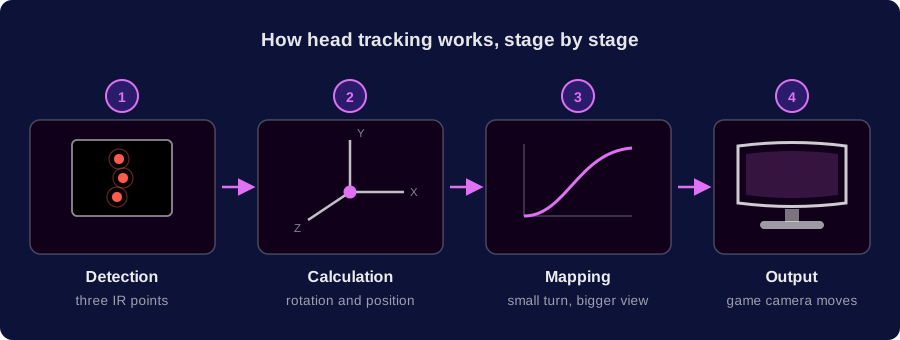
Head tracking works in four stages: a sensor detects movement, software calculates the head pose, the movement is mapped to useful output, and the game updates its camera view.
1. A tracker detects movement
The input depends on the tracking method. An IR system uses a camera to watch a fixed pattern of infrared points on an emitter worn on a headset or head strap. It follows those reference points rather than trying to recognise the user’s face. Webcam-based systems estimate the position of facial features, while inertial systems use sensors such as gyroscopes and accelerometers.
2. Software calculates head position and rotation
With three-point IR tracking, the software observes how the shape and position of the LED pattern change in the camera image. From that geometry, it estimates rotation – yaw, pitch and roll – and positional movement along the X, Y and Z axes.
3. Mapping turns small movements into a useful view range
You do not need to turn your head as far as the in-game camera turns. OpenTrack uses adjustable mapping curves, so your head might turn only a little while the in-game camera turns far enough to check a side window or look behind an aircraft – your eyes stay on the screen. Sensitivity, smoothing, dead zones and a centre position can all be adjusted to suit the screen, seating position and game.
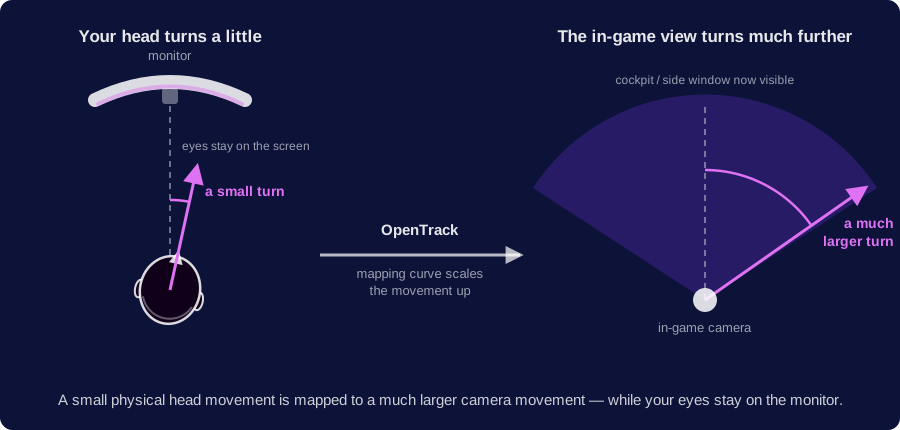
The useful range is not the same for every game. A sim racer may want subtle movement for mirrors and corner apexes, while a pilot may choose a wider range for checking behind the aircraft. Separate profiles make those choices easier to keep consistent.
4. The game receives the tracking output
OpenTrack sends the calculated movement through an output protocol that the game can use. The game then updates the camera view as the tracking data changes.
How responsive the result feels depends on the whole chain: detection, camera settings, software configuration, the PC and the game. There is no single latency figure that applies to every setup. Stable detection and sensible mapping matter more than an unsupported universal speed claim.
What Equipment Does Infrared Head Tracking Need?
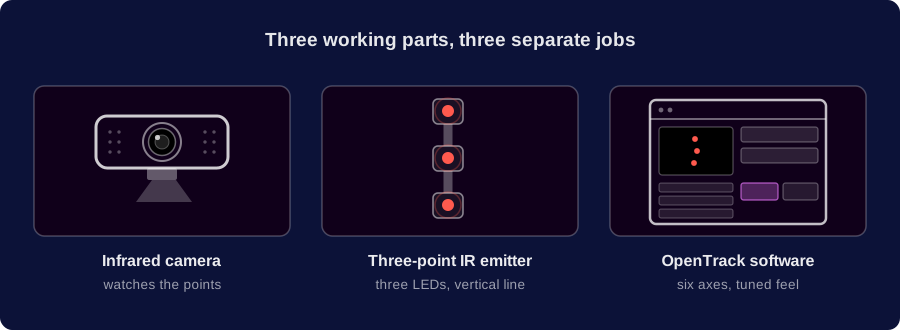
An IR head tracking setup has three working parts: a camera, a point emitter and tracking software. Each part has a separate job.
An infrared tracking camera
The camera observes the emitter’s infrared points and sends their changing positions to the tracking software. It needs a clear view of all three points throughout the movement range.
The useful camera image is the three-point pattern, not a normal picture of the room or a recognisable view of your face. This is a recurring first-day question in Delanclip support: a new user opens the camera preview, sees a dark frame with bright dots instead of a recognisable image, and assumes the camera is faulty. It usually is not – an IR-filtered preview is supposed to look unlike an ordinary webcam feed, and those clean dots are exactly what the tracking software needs.
Frame rate is only one part of tracking quality. DelanCam1 operates at 60 fps; in practical setup and support work, stable exposure, clean point detection, correct geometry and an unobstructed field of view matter more than chasing a higher frame-rate number on its own.
Room conditions matter, though not in the way you might expect. A camera built for IR tracking carries a daylight filter, so it isn’t looking at a picture of the room – it’s looking for bright infrared points. What it can’t do is tell one infrared source from another: anything giving off infrared light in its direction gets picked up the same way as the emitter’s points.
Ambient daylight in the room isn’t a problem. Direct sunlight hitting the camera is different – it brightens the image and can introduce false points, but that’s a matter of brightness, and brightness is exactly what the detection threshold corrects for. Only very strong light aimed straight into the lens goes beyond what the threshold can compensate for.
A different infrared source in the frame is a separate issue, because it gives off the same kind of light the camera is looking for – no threshold setting can tell the two apart. That could be a TV remote, a second emitter nearby, the infrared sensor in a phone pointed at the camera, or the IR illuminator on a security camera. That kind of interference only goes away physically, by changing the position of the camera or the source. Reflections work the same way: a reflected daylight glare gets filtered out, but a reflected beam of infrared light aimed into the lens will still interfere with tracking.
A three-point IR emitter
The emitter places three infrared LEDs in a fixed arrangement. Because the camera can see how that pattern changes as the player moves, the software can distinguish both rotation and position.
An emitter can be wired or battery-powered. Delanclip Starter is wired, while Delanclip Fusion uses a rechargeable battery that lasts at least 24 hours on one charge. The tracking principle is the same in both cases: the camera follows the three points rather than a wireless data connection from the emitter.
OpenTrack software
OpenTrack converts the detected point pattern into six movement axes and sends them to a compatible game. It also provides the controls that shape how tracking feels: mapping curves, smoothing, dead zones, centring and separate profiles.
There is no universal OpenTrack profile that is ideal for every player or every simulation. Screen size, distance from the camera, seating position, the view range needed in the game and personal preference all affect the right curve. Start with a known working setup, confirm that the camera sees three clean points, and then adjust one setting at a time. Delanclip’s IR tracking setup guide covers the practical configuration process.
What Is 6DoF Head Tracking?
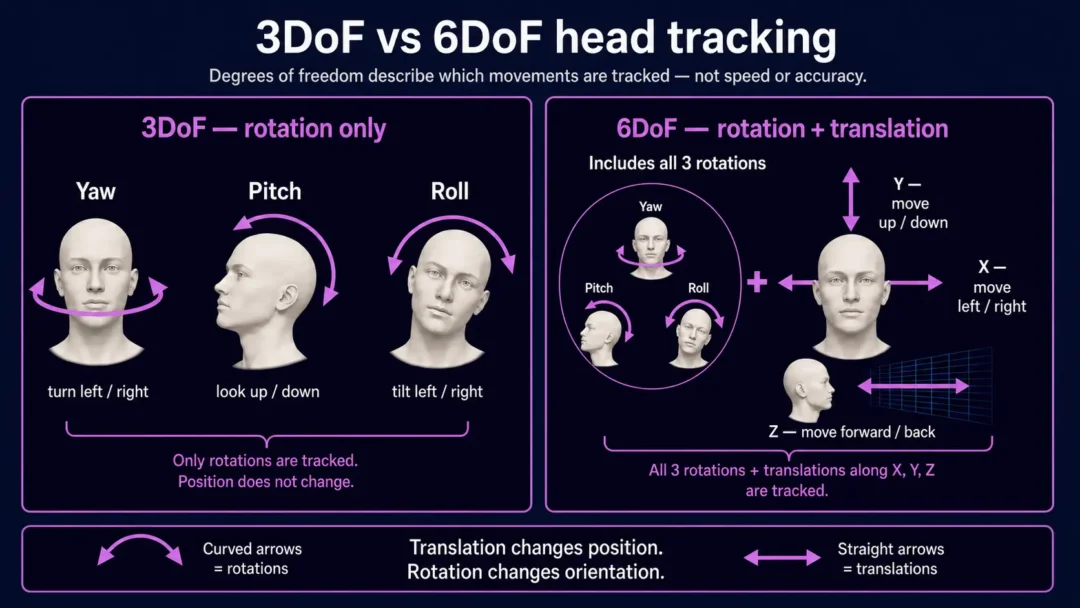
Six degrees of freedom, or 6DoF, means tracking three rotational movements and three positional movements. It describes which movements a system can measure, not how fast or accurate the system is.
| Movement | Axis | What you do physically |
|---|---|---|
| Yaw | Rotation | Turn your head left or right |
| Pitch | Rotation | Look up or down |
| Roll | Rotation | Tilt your head towards either shoulder |
| X | Position | Move left or right |
| Y | Position | Move up or down |
| Z | Position | Lean forward or backward |
Three degrees of freedom, or 3DoF, covers yaw, pitch and roll only. A 6DoF setup adds the ability to lean towards an instrument, move sideways to look around an obstruction or change eye height in a cockpit. Whether a setup provides 3DoF or 6DoF depends on its sensors and software configuration; a correctly configured three-point IR emitter can provide full 6DoF.
What Are the Main Head Tracking Methods?
There is no single sensor used by every head tracking system. The main methods make different trade-offs.
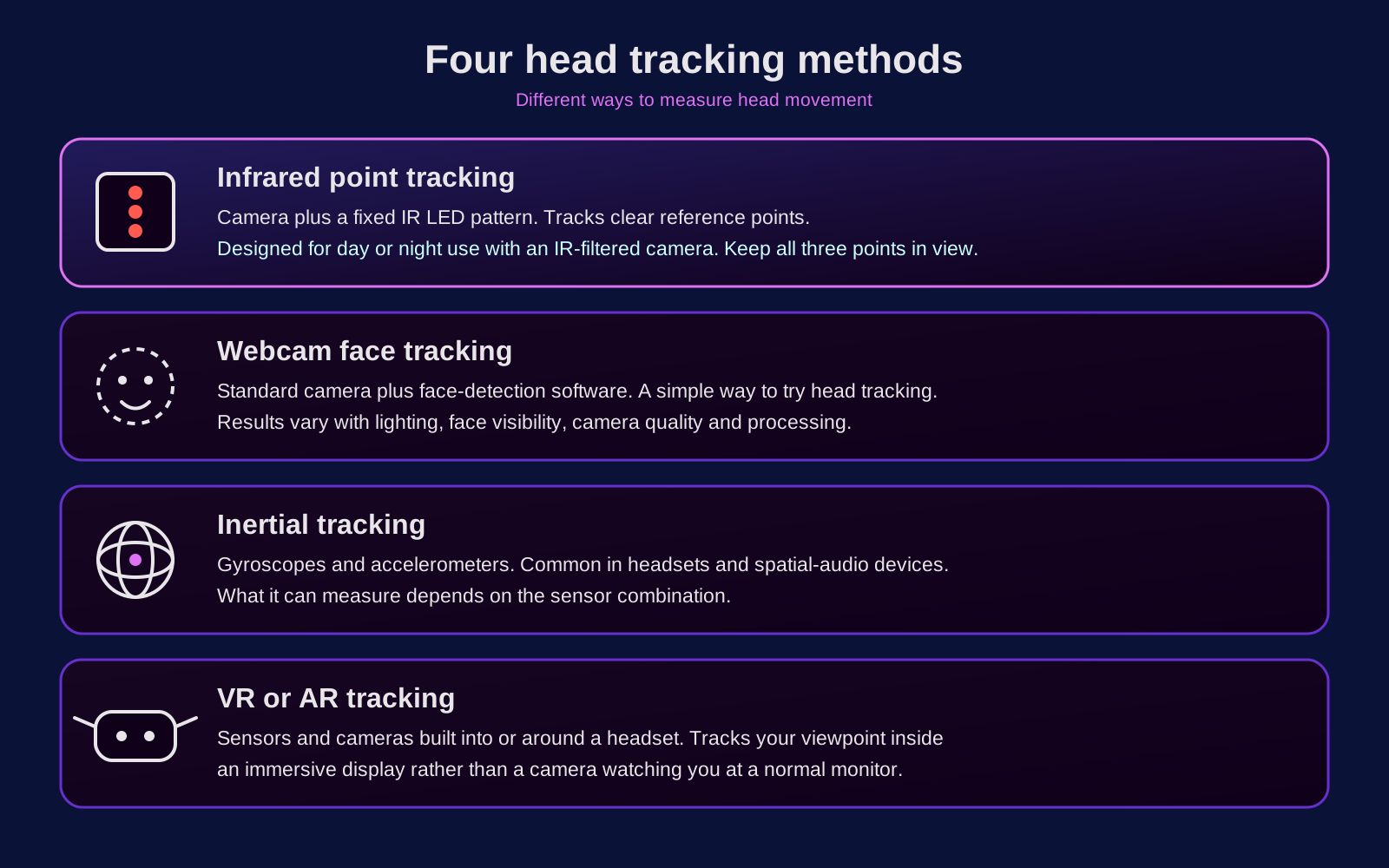
| Method | What it uses | Useful distinction |
|---|---|---|
| Infrared point tracking | Camera and a fixed IR LED pattern | Tracks clear reference points; requires line of sight and sensible control of ambient IR light |
| Webcam face tracking | Standard camera and face-detection software | An accessible way to test the idea; results depend on lighting, camera quality and processing |
| Inertial tracking | Gyroscopes and accelerometers | Common in headsets and spatial-audio devices; capabilities depend on the sensor combination |
| VR or AR tracking | Sensors and cameras built into or around a headset | Tracks the user’s viewpoint inside an immersive display rather than a camera on a normal monitor |
These methods are not interchangeable in every situation. A webcam can be a practical first experiment, and the webcam face tracking guide covers that route in detail. A dedicated IR setup uses known reference points and is designed for consistent camera-based detection. VR adds a head-mounted display and solves a different problem.
Why Use Head Tracking With a Normal Monitor?
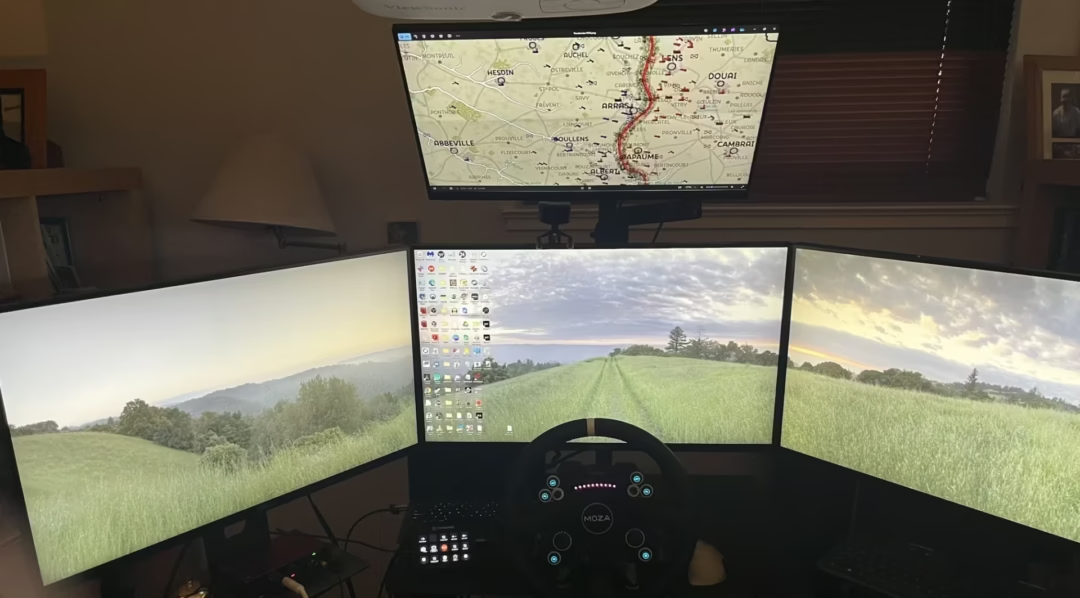
The main benefit is direct camera control without moving a hand away from the primary controls. Instead of holding a mouse-look button or repeatedly using a hat switch, the player looks towards the part of the scene they want to inspect.
Natural camera control
Looking towards a mirror, instrument or side window becomes one continuous movement rather than a sequence of button presses. The response can be tuned: a gentle curve for precise cockpit work, a faster curve for a wider view, or a small dead zone around the centre.
Hands remain on the main controls
In a flight, driving, farming or space simulation, both hands may already be occupied. Head tracking can control the view while the player continues to use a stick, throttle, wheel, keyboard or other controls.
The physical setup remains visible
A monitor-based system leaves the keyboard, button boxes, notes and surrounding room in view. It can be used with a single screen or a multi-monitor setup, although the preferred mapping curve may differ. That does not make it universally better than VR; it simply makes it a different option for players who want head-controlled viewing without wearing a display.
It works across several simulation genres
Head tracking is commonly used in flight, space, driving, trucking, farming and selected tactical games. Support and configuration differ between titles, so check the head tracking games guide rather than assuming that every game handles the same output protocol in the same way.
Head tracking and VR solve different needs. For a detailed comparison of comfort, hardware requirements and visibility of physical controls, read our head tracking vs VR guide.
What Makes Head Tracking Feel Accurate?
Accurate-feeling tracking starts with clean, stable detection. Part of the reason a three-point IR setup behaves consistently is that the software is given a known shape to follow rather than having to work out what it is looking at.
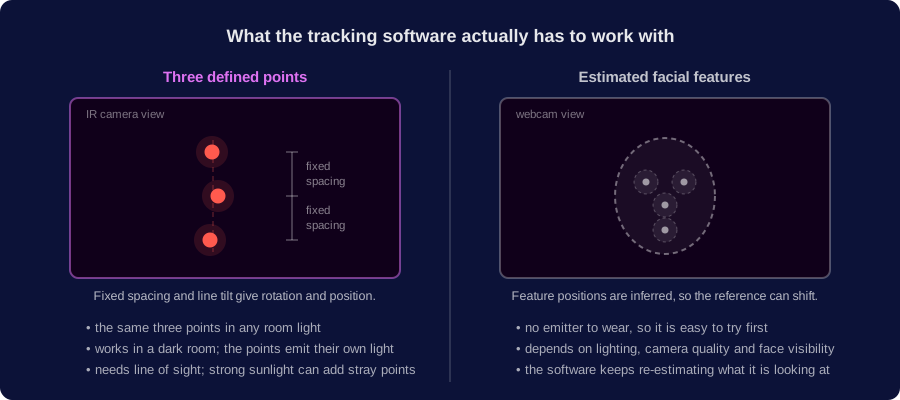
The first checks used in Delanclip support are practical rather than theoretical:
- the camera can see all three points throughout the intended movement range;
- the emitter is mounted securely and as vertically as the setup allows;
- the camera starts near the centre of the display where practical, but is aimed at the emitter rather than at the user’s face;
- a side-mounted emitter remains comfortably inside the camera frame, even if that requires a small camera offset or angle adjustment;
- the OpenTrack camera view shows three clean points rather than reflections or merged blobs;
- the threshold suits the room lighting;
- the correct input, output and profile are selected;
- a centring shortcut is configured and easy to reach.
If a point leaves the camera frame, tracking loss is expected – the software no longer has the complete pattern it needs. Jitter can also come from poor focus, unstable mounting, infrared contamination, USB problems or another tracking application running in the background. This is why a well-configured 60 fps camera can feel better than a higher-specification camera with unstable detection.
Written and reviewed by Tomasz Delanowski, founder and managing director of Delan Engineering Ltd, the company behind Delanclip. This guide draws on Delanclip’s product-development and customer-support experience with infrared head tracking hardware, OpenTrack setups and recurring questions from people using head tracking for the first time.
Last reviewed: 2026-09-09
Frequently Asked Questions About Head Tracking
Do I need VR for head tracking?
No. Monitor-based head tracking uses your head movement to control the in-game camera while the image stays on a normal screen. VR places the image inside a headset. They can support similar games, but they are different viewing setups.
How far do I have to turn my head?
There is no fixed angle. OpenTrack mapping curves let a small physical head turn produce a much larger in-game camera turn, while your eyes stay on the monitor. You can make the response gentler or more aggressive for different games and screen layouts.
Do I need to wear headphones?
No. The emitter needs a stable position on your head and a clear line of sight to the camera, but it does not have to be attached to headphones. A head strap is an alternative for people who play through speakers or do not want to wear a headset.
Should an IR tracking camera show a normal picture of my face?
Not necessarily. In point-tracking mode, the important image is three clean infrared points. A camera filtered for IR tracking may not look like a normal webcam, and the software does not need a detailed image of your face to calculate movement.
Can I use a webcam for head tracking?
Yes, if you want face tracking – it is the simplest way to see how head tracking behaves in a game. An ordinary webcam is not suitable for IR tracking, though. The cheap route to IR is a PS3 camera converted for infrared tracking: PS3 camera conversion guide.
What is the difference between 3DoF and 6DoF?
3DoF tracks rotation: yaw, pitch and roll. 6DoF adds movement along the X, Y and Z axes, allowing the user to lean forward, move sideways and change height as well as look around.
Does infrared head tracking work in the dark?
Yes – head tracking that uses infrared is built for darkness. The camera reads the light from the emitter, not a face lit by the room. A dark room actually makes detection cleaner.
Do screen size and camera position matter?
They can affect setup, but they do not change the basic tracking principle. The camera must keep all three points in view as you move. An unusually high monitor, a large TV at close range or a deep seating position may require more careful camera placement, angle adjustment or different optics.
What games support head tracking?
Many PC games can use head tracking through native TrackIR support or an output provided by OpenTrack. Examples include DCS World, Microsoft Flight Simulator, Star Citizen, Elite Dangerous, Euro Truck Simulator 2 and Farming Simulator. Compatibility and setup can change, so use the current game guide for title-specific information.
Is head tracking worth it for gaming?
It is most useful when a game regularly asks the player to look around a cockpit, cabin or vehicle while keeping both hands on other controls. Its value depends on the games you play, your screen and control setup, and whether you prefer it to mouse-look, a hat switch or VR.